


From never having opened Google Flow to a finished, captioned video in less than half a day.
The story of how and why I created the above video from a single image and an idea continues after this brief introduction.
AI hasn’t replaced the creative process, but the tools have compressed the distance between “idea” and “visualization.” Just as the shift from pen and ink to digital drawing and animation accelerated and democratized execution, the AI technologies are doing the same.
It allowed me to be the screenwriter, director, and editor of a story that, just a year ago, to realize would have required a whole team of animators, and a budget to match.
This article isn’t really a tutorial on using Google Flow. There are plenty of great YouTube videos and examples out there. The key takeaway here is that you can learn to use these tools with you acting as the screenwriter, Director and editor.
But first! Don’t over-index on artistic perfection; this is not a Hollywood movie.
That’s not Stephen Spielberg calling.
As a storytelling and an inspiration tool, these tools are incredibly easy to use, but difficult to tame.
Like everything with AI, it’s evolving incredibly rapidly, so what’s true at the time of writing could change in the next week.
I deliberately chose to stay away from photorealistic person storytelling, as that’s where things get very ‘uncanny valley-y’ and weird, but used it like this with an animation/comic book style…Wow!
However, if you WOULD like to see how I went through this process, just leave a comment below, and I might consider creating a video on how I made this.
In the world of Product Management, we often talk about NIHITO (Nothing Important Happens Inside The Office). It’s a core pillar of the Pragmatic Framework,
But dryly explaining the “what and why” is one thing—stimulating “wow” and visualizing the “how “ is a whole other.
For the Alignment Files: Part 3 — Intellectual Hitchhiking article, I had already expressed a little creative vision by creating my Product Manager noir detective character.
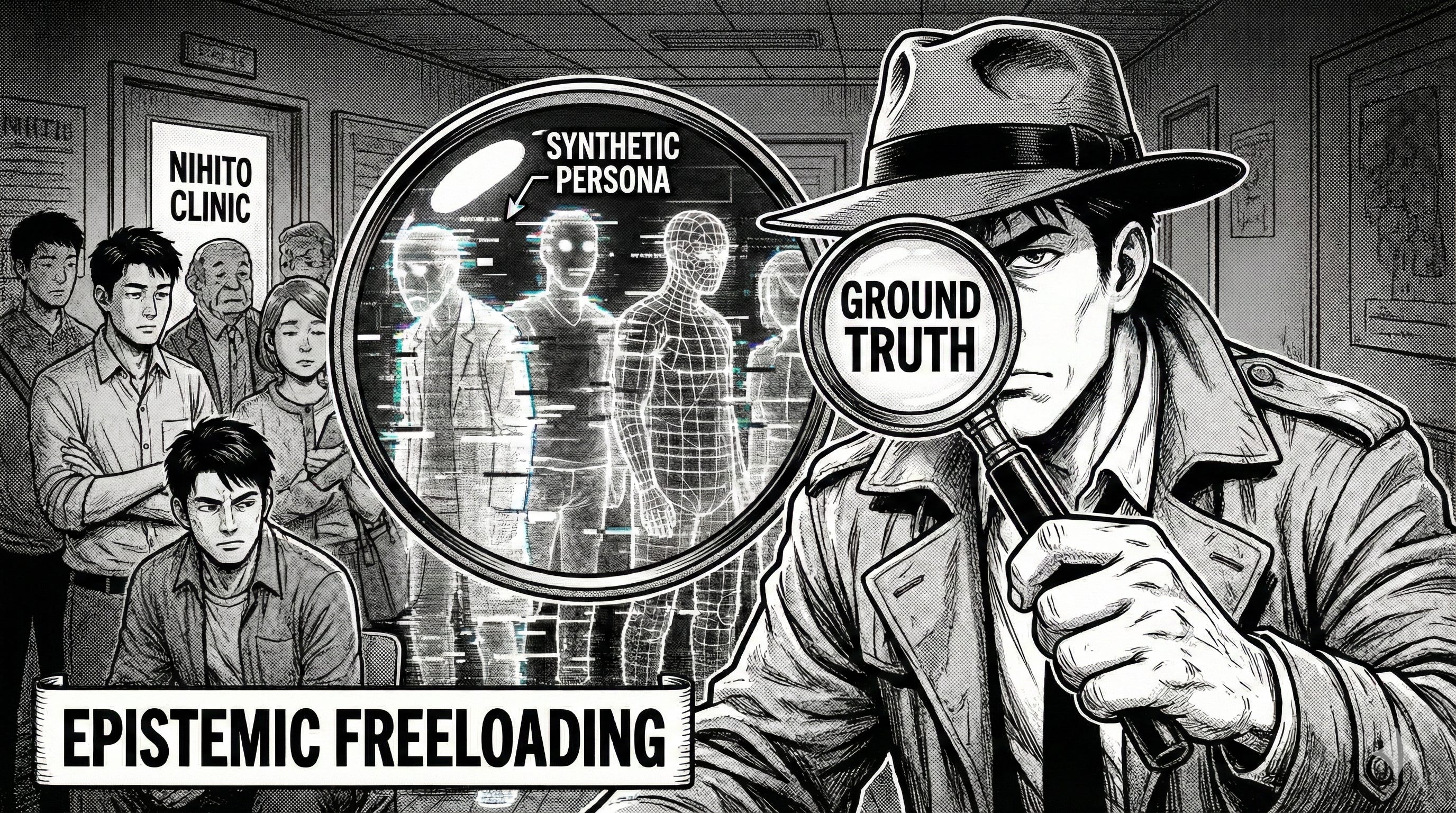
But I wanted to take my readers beyond the static dullness of a dry written explanation.
I wanted them to follow our PM Detective’s ‘Hero’s Journey’ as he navigates the fog of synthetic data to find the “Ground Truth.”
Here is how I turned a single image, which I was already delighted with (thanks, Nano Banana), into a cinematic journey using Google Flow, Adobe Premiere, and a bit of creative experimental grit.
Disclaimer. I have absolutely minimal to zero design or artistic capabilities, but I do know how to verbally visualize and tell a great story. :-)
The Challenge: Maintaining Aesthetic Continuity
One of the biggest hurdles in AI content creation is “style drift.”
I had a specific seinen manga style for the illustrations in the five articles. In part 3, the original image shows our Product Manager hero as a noir-style detective seeking the “Ground Truth,” surrounded by Synthetic personas.
That fits the lessons in the article about the risks and dangers of overly relying on AI-generated synthetic user personas, instead of getting out of the office, away from the computer, and actually talking to users and potential users.
In this video story, I wanted our Product Manager detective to look the same, feel the same, and inhabit the same world in every frame and flow from scene to scene.
The Workflow: From Brainstorm to Premiere
I’ve always believed that the best tools are the ones that get out of your way. This was my first time using Google Flow, and after a bit of bumbling around and a few key questions to Gemini, the learning curve was surprisingly intuitive.
The Anchor Image: I started with the high-fidelity reference image that established the lighting, character design (our fedora-clad detective), and the “Synthetic Persona” visual language.
Prompt Engineering in Flow: Using the anchor image as a stylistic North Star, I crafted a series of custom prompts for each scene.
The first prompt is super important for describing the story’s overall style and approach, so it should be more structured and detailed.
The First Prompt
Visual Style: 16:9 aspect ratio, high-contrast Japanese Seinen Manga aesthetic. Deep blacks, heavy purposeful ink lines, and professional screentone textures for atmospheric shading.
Scene & Character: A crowded, dimly lit corridor outside “NIHITO Clinic”. The protagonist—a plucky Japanese male product manager with a rugged, action-hero face and short, neat, dark hair—is wearing a noir trench coat and fedora.
Action: He holds a “ghostly” magnifying glass up to his eye, scanning the somber crowd. As the lens passes over seemingly normal people, it reveals “Synthetic Personas”—shimmering, glitching wireframe apparitions that flicker in and out of existence. The protagonist’s expression shifts from intense, detective-like focus to a sudden, sharp look of shock as he realizes how many in the corridor are artificial.
Camera Movement: A slow, dramatic dolly-in toward the protagonist’s face, ending in a tight close-up of his widening eye reflected in the magnifying glass.
I used the video clip generated from this prompt as my anchor scene 1 in Google Flow. Everything from there on was pure storytelling using the ‘Text to Flow’ feature.
You MUST let each scene generate before then repeating the process to proceed with the scene sequence in your story. I simply used my imagination to describe each scene, then generated the next one after the other.
Capturing the “Ground Truth”:
In my case, the storyboard follows a clear arc:
The detective realizes his current data is synthetic, physically breaks through those digital barriers, and finally enters the NIHITO Clinic to sit face-to-face with real customers.
I described the action—the detective peering through his “Ground Truth Lens,” the physical fight with the digital personas, the warm interior of getting to real people inside the clinic, then his slow, satisfied walk back to the office, job well done—while ensuring Flow referenced the original style and kept a consistent…no pun intended…flow!
Post-Production in Adobe Premiere:
Now, let’s be clear: what gets generated is great, but it’s not push-the-button, release-ready.
The generated clips had some weird overlaps that needed trimming.
Once I had generated them, I found I didn’t like the sequence, and I wanted to change it up to adjust the story slightly.
The audio it generated was interesting and fun, but wasn’t a script… lesson for next time: give it a clear script in the prompts.
Also, the voice dialog didn’t come from the same characters consistently. That kind of fits okay with my aesthetic of English-dubbed Japanese manga, but probably wouldn’t work with other styles as well.
So, being a good YouTube editor with basic skills, once the clips were generated, I moved to Premiere to stitch the narrative together.
I added the following:
Text Overlays: Black lower bar with comic-style fonts to drive the “Manga comic” rather than a more anime storytelling feel.
Music Track: Because I didn’t want to do a full narrated overdub with foley sounds at this time, I decided to use the comic book captions and instead found a good royalty-free music track with an Asian feel to provide that driving, investigative energy soundtrack.
Lessons Learned: The High-Velocity Creative Workflow
Moving from a concept to a finished narrative video in a single afternoon taught me several things about the future of professional communications.
For product leaders and business consultants, the “Lesson” isn’t just about the AI video technology—it’s about the shift in how we tell stories.
1. The “Anchor” is Your Insurance Policy
The biggest risk in AI content is “hallucination” or stylistic drift. By starting with a high-fidelity anchor image, I wasn’t just giving the AI a suggestion; I was giving it a fixing it in place with a constraint.
The Takeaway: In any AI project, define your “Non-Negotiables” (style, character, tone—and script is applicable) first. It’s much faster to refine a consistent style than to try to fix a disjointed one later in the edit.
2. Constraints Breed Speed
I didn’t try to make a 10-minute ‘Oscar-winning’ short movie. I focused on a 35-second “Visual Metaphor.” By limiting the scope to five key storyboard beats, I avoided the “infinite refinement” trap. I’m a business professional, not a Tisch School of Film MFA grad.
The Takeaway: Use AI to solve a specific communication problem, not to replace an entire film studio. A compelling 30-second high-impact video is often more effective for a professional audience than a long-form presentation.
3. Human “Direction” is the New “AI Creation.”
Even with tools as powerful as Google Flow, the AI didn’t know the meaning of the “Ground Truth Lens” or why the detective needed to tackle the synthetic persona. The narrative intent came from years of product/market experience; the AI simply provided the “labor” to visualize it.
The Takeaway: Your value as a leader isn’t in your ability to draw or edit—it’s in your ability to direct the tools to deliver a deep, proprietary insight and tell a compelling story. In my case, leave them wanting more.
4. The “Good Enough” vs. “Perfect” Threshold
Was every frame of the manga perfect? Perhaps not to a professional animator. But for an article explaining a product management framework principle, it was extraordinary.
The Takeaway: AI allows you to hit the “80% quality” mark at 5% of the traditional cost and time.
For business communication, that 80%—when paired with a strong message—is your competitive advantage.
5. Post-Production is the “Glue.”
Raw AI video can feel disjointed. The real “magic” happened in Adobe Premiere when I edited, added the music, and the manga-style captions. That “human touch” at the end of the process is what turned a collection of clips into a cohesive brand asset.
The Takeaway: Never post “raw” AI output. It’s fun, it might be kooky, or it might just be incredibly dull. The final 10% of effort—editing, branding, and pacing—is what provides the professional polish that will hold your audience’s attention.
Why This Matters for Product Leaders and Consultants
As a product coach, I’m constantly looking for ways to communicate complex ideas, models, and frameworks (like the Herringbone or Alignment Files) in ways that stick.
Use these visualization tools to reach people with your story in a way that words (spoken or written) just won’t do.
SM

